Friday, May 30, 2008
Wednesday, May 28, 2008
Easy way to modify/edit unix files directly from windows
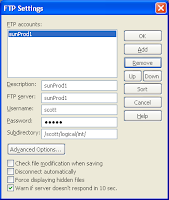 If you are new to unix operating system ,modifying the files using vi is difficult, atleast in the begining days.Here is an easy way to edit the unix files directly from windows.
1]Open your EditPlus editor.
2]Go to File->FTP->Ftp Settings
Here add an account to your unix machine:Name of the unix machine,user with which you login,password and the path.This step is required only once
3]Once you are done with step2, go to File->FTP->Open Remote
Select your account and click browse.Navigate to the required file and open it.Now edit the file and finally save it.This way you can forget the painful way of editing via vi.
I didn't face any issues while compiling the files edited using the method.If you come across any, please comment here.
Tuesday, May 27, 2008
Transferring web pages and mht
 When web pages are saved as html pages, the css content,the graphic content such as images etc stored in a folder parallel to the .html file.Now if you want to transfer this html file,you have to send this folder too.This makes transfer/upload/sharing of html files difficult.
With Internet Explorer[>5] you can save your html page As Web archive or Single html file.This embeds/encodes the graphic/media content used by the html page into a single MHTml file[MIME Html page] making it easy to share with others.Open an mht file in a notepad and observe the embedded stuff.Firefox 3.x and above has support for saving the web pages in mht format.
Monday, May 26, 2008
Usage of datatypes in E1 Business Functions
Float/Math_Numeric
To a specific value:
MATH_NUMERIC an8mn = {0};
F0110 dsF0101 = {0};
int an8 =123;
IntToMathNumeric(an8,&an8mn);
MathCopy(&dsF0101.aban8,&an8mn);
Now the Math_Numeric field aban8 is set to 123 value;
T0 zero:
ZeroMathNumeric(&dsF0101.aban8);
Character/EVDT_CHAR
F986101 dsF986101={0};
dsF986101.OMDATM = _J('P');
To a specific value:
MATH_NUMERIC an8mn = {0};
F0110 dsF0101 = {0};
int an8 =123;
IntToMathNumeric(an8,&an8mn);
MathCopy(&dsF0101.aban8,&an8mn);
Now the Math_Numeric field aban8 is set to 123 value;
T0 zero:
ZeroMathNumeric(&dsF0101.aban8);
Character/EVDT_CHAR
F986101 dsF986101={0};
dsF986101.OMDATM = _J('P');
Friday, May 23, 2008
Enabling or Disabling Auditing resulting in some loss of data?
If you observe, Enabling/Disabling 21 CFR11 Auditing a table resulting in some loss of data,make sure the user with which you are enabling/disabling doesn't have any row security.
Suppose you are disabling auditing on F0101, and you have row security restriction that you cannot see the data from AN8=20 to AN8=50.When you disable auditing, the records in this range are not selected for insertion[from F0101_ADT to F0101].
Tip: So never enable/disable auditing with a user having row security restrictions
Note: All CFR configuration changes are recorded in to the Security History table,F9312
Suppose you are disabling auditing on F0101, and you have row security restriction that you cannot see the data from AN8=20 to AN8=50.When you disable auditing, the records in this range are not selected for insertion[from F0101_ADT to F0101].
Tip: So never enable/disable auditing with a user having row security restrictions
Note: All CFR configuration changes are recorded in to the Security History table,F9312
Wednesday, May 21, 2008
Easy way to create jpg/png image files using Microsoft Word
 Generally when we take print screen of an object we use mspaint to get the image equivalent file. When you are taking multiple screenshots, the above process is time consuming one.Instead you can use Microsoft Word to get the images in one go.Here is how you get it:
1]Open an empty word document
2]Take the print screen of the desired windows[Prnt Scrn or Alt+Prnt Scrn] and paste them in the opened word document one by one.
3]Now save the document as html web page.
4]All the screens in the document will be individually saved as jpg/png image files.
error C2026: string too big, trailing characters truncated
One solution to resolve this error :error C2026: string too big, trailing characters truncated
#define S0 _J("abcdefghijklmnopqrstuvwxyabcdefghijklmnopqrstuvwxyabcdefghijklmnopqrstuvwxy")
#define S1 S0 S0 S0 S0 S0 S0 S0
void main()
{
JCHAR command[] = S1;
: : : : :
}
#define S0 _J("abcdefghijklmnopqrstuvwxyabcdefghijklmnopqrstuvwxyabcdefghijklmnopqrstuvwxy")
#define S1 S0 S0 S0 S0 S0 S0 S0
void main()
{
JCHAR command[] = S1;
: : : : :
}
Monday, May 19, 2008
Useful Information on Windows Crash Dumps
http://www.networkworld.com/news/2005/041105-windows-crash.html
http://www.microsoft.com/whdc/devtools/debugging/default.mspx
http://www.microsoft.com/whdc/devtools/debugging/default.mspx
Tuesday, May 13, 2008
Collaborate 2008 Presentations
 Access some of the presentations, for the sessions taken at the recent Collaborate 08 event, Denver.The presentations will be available until May 15 Quest.
Filter by the Product/Technology for specific presentations.
SQLGetData to get BLOB data
HENV hEnv = NULL;
HDBC hdbc = NULL;
HSTMT hStmt = NULL;
long totalLength=0;
unsigned char * myBlob = new unsigned char[5000000];
rc = SQLAllocHandle(SQL_HANDLE_ENV,SQL_NULL_HANDLE,&hEnv);
rc = SQLSetEnvAttr(hEnv, SQL_ATTR_ODBC_VERSION, (SQLPOINTER) SQL_OV_ODBC3, SQL_IS_UINTEGER);
rc = SQLAllocHandle(SQL_HANDLE_DBC, hEnv, &hdbc);
rc = SQLConnect(hdbc,(SQLCHAR *)"myDSN",SQL_NTS,
(SQLCHAR *)"user_id",SQL_NTS,
(SQLCHAR *)"password",SQL_NTS);
rc = SQLAllocHandle(SQL_HANDLE_STMT,hdbc,&hStmt);
sprintf(sqlStr,"Select logo from dbo.ImageTable");
printf("\n Sql String: %s",sqlStr);
rc = SQLExecDirect(hStmt,(SQLCHAR *) sqlStr,SQL_NTS);
rc = SQLFetch(hStmt);
rc = SQLGetData( hStmt, 1, SQL_C_BINARY,
(SQLPOINTER) ((char *) (myBlob)),(SQLINTEGER) 5000000,
(SQLLEN *) &totalLength );
HDBC hdbc = NULL;
HSTMT hStmt = NULL;
long totalLength=0;
unsigned char * myBlob = new unsigned char[5000000];
rc = SQLAllocHandle(SQL_HANDLE_ENV,SQL_NULL_HANDLE,&hEnv);
rc = SQLSetEnvAttr(hEnv, SQL_ATTR_ODBC_VERSION, (SQLPOINTER) SQL_OV_ODBC3, SQL_IS_UINTEGER);
rc = SQLAllocHandle(SQL_HANDLE_DBC, hEnv, &hdbc);
rc = SQLConnect(hdbc,(SQLCHAR *)"myDSN",SQL_NTS,
(SQLCHAR *)"user_id",SQL_NTS,
(SQLCHAR *)"password",SQL_NTS);
rc = SQLAllocHandle(SQL_HANDLE_STMT,hdbc,&hStmt);
sprintf(sqlStr,"Select logo from dbo.ImageTable");
printf("\n Sql String: %s",sqlStr);
rc = SQLExecDirect(hStmt,(SQLCHAR *) sqlStr,SQL_NTS);
rc = SQLFetch(hStmt);
rc = SQLGetData( hStmt, 1, SQL_C_BINARY,
(SQLPOINTER) ((char *) (myBlob)),(SQLINTEGER) 5000000,
(SQLLEN *) &totalLength );
specGenerateOnDemand
The following specGenerateOnDemand flag will determine whether web jiti to happen or not if the serialized specs are not found in the persistent cache
[JDBj-RUTNIME PROPERTIES]
specGenerateOnDemand=true
This flag is not available in older tools releases like SP22/23/24/893.Manual generation of the specs is necessary in these applications.I believe this option is available from 894 Tools release onwards.
[JDBj-RUTNIME PROPERTIES]
specGenerateOnDemand=true
This flag is not available in older tools releases like SP22/23/24/893.Manual generation of the specs is necessary in these applications.I believe this option is available from 894 Tools release onwards.
Monday, May 12, 2008
[Microsoft][ODBC Driver Manager] Function sequence error SQLSTATE: HY010
int main()
{
HENV hEnv = NULL;
HDBC hdbc = NULL;
SQLRETURN rc;
SQLRETURN rc2;
SQLCHAR SqlState[6], SQLStmt[100], Msg[SQL_MAX_MESSAGE_LENGTH];
SQLINTEGER NativeError;
SQLSMALLINT MsgLen;
printf("Hello ODBC Program");
// Allocate Environment Handle
rc = SQLAllocHandle(SQL_HANDLE_ENV,SQL_NULL_HANDLE,&hEnv);
if((rc != SQL_SUCCESS) && (rc!=SQL_SUCCESS_WITH_INFO))
{
SQLFreeHandle(SQL_HANDLE_ENV,hEnv);
exit(255);
}
rc = SQLSetEnvAttr(hEnv, SQL_ATTR_ODBC_VERSION, (SQLPOINTER) SQL_OV_ODBC3, SQL_IS_UINTEGER);
if((rc != SQL_SUCCESS) && (rc!=SQL_SUCCESS_WITH_INFO))
{
SQLFreeHandle(SQL_HANDLE_ENV,hEnv);
exit(255);
}
// Allocate Connection Handle
rc = SQLAllocHandle(SQL_HANDLE_DBC, hEnv, &hdbc);
if((rc != SQL_SUCCESS) && (rc!=SQL_SUCCESS_WITH_INFO))
{
if( (rc2 = SQLGetDiagRec(SQL_HANDLE_ENV, hEnv, 1, SqlState, &NativeError,
Msg, sizeof(Msg), &MsgLen)) != SQL_NO_DATA)
printf("\n Error %s SQLSTATE: %s, NativeError: %d",Msg,SqlState,NativeError);
SQLFreeHandle(SQL_HANDLE_ENV,hEnv);
exit(255);
}
return(0);
}
I got the above "[Microsoft][ODBC Driver Manager] Function sequence error SQLSTATE: HY010" error when I tried to create connection handle.When I set the environment attribute SQL_ATTR_ODBC_VERSION to ODBC3.0
{
HENV hEnv = NULL;
HDBC hdbc = NULL;
SQLRETURN rc;
SQLRETURN rc2;
SQLCHAR SqlState[6], SQLStmt[100], Msg[SQL_MAX_MESSAGE_LENGTH];
SQLINTEGER NativeError;
SQLSMALLINT MsgLen;
printf("Hello ODBC Program");
// Allocate Environment Handle
rc = SQLAllocHandle(SQL_HANDLE_ENV,SQL_NULL_HANDLE,&hEnv);
if((rc != SQL_SUCCESS) && (rc!=SQL_SUCCESS_WITH_INFO))
{
SQLFreeHandle(SQL_HANDLE_ENV,hEnv);
exit(255);
}
rc = SQLSetEnvAttr(hEnv, SQL_ATTR_ODBC_VERSION, (SQLPOINTER) SQL_OV_ODBC3, SQL_IS_UINTEGER);
if((rc != SQL_SUCCESS) && (rc!=SQL_SUCCESS_WITH_INFO))
{
SQLFreeHandle(SQL_HANDLE_ENV,hEnv);
exit(255);
}
// Allocate Connection Handle
rc = SQLAllocHandle(SQL_HANDLE_DBC, hEnv, &hdbc);
if((rc != SQL_SUCCESS) && (rc!=SQL_SUCCESS_WITH_INFO))
{
if( (rc2 = SQLGetDiagRec(SQL_HANDLE_ENV, hEnv, 1, SqlState, &NativeError,
Msg, sizeof(Msg), &MsgLen)) != SQL_NO_DATA)
printf("\n Error %s SQLSTATE: %s, NativeError: %d",Msg,SqlState,NativeError);
SQLFreeHandle(SQL_HANDLE_ENV,hEnv);
exit(255);
}
return(0);
}
I got the above "[Microsoft][ODBC Driver Manager] Function sequence error SQLSTATE: HY010" error when I tried to create connection handle.When I set the environment attribute SQL_ATTR_ODBC_VERSION to ODBC3.0
Sunday, May 11, 2008


Friday, May 9, 2008
810 and 896 call object Kernel
We all know that the 896 Call Object kernel runs in Multi-thread mode by default.Application code is made thread safe from 811SP1 only.So what happens when 810 is used with 896 tools code.It will automatically turn the CO kernel to single threaded mode at the time of kernel startup.you can observe this in jde.log of CO kernel.
Multi-threaded configuration is not supported with 810 and earlier release. Switching back to single-threaded Configuration.
KNT0000777 - Call Object Kernel in single-threaded mode.
Multi-threaded configuration is not supported with 810 and earlier release. Switching back to single-threaded Configuration.
KNT0000777 - Call Object Kernel in single-threaded mode.
Tuesday, May 6, 2008
ORA-01031: insufficient privileges with sqlplus /AS SYSDBA
C:\>sqlplus "/AS SYSDBA"
SQL*Plus: Release 10.2.0.3.0 - Production on Tue May 6 04:42:32 2008
Copyright (c) 1982, 2006, Oracle. All Rights Reserved.
ERROR:
ORA-01031: insufficient privileges
Enter user-name:
If you are getting the above error when you try to login with "sqlplus /AS SYSDBA", please check if the following are properly set.
1] The Windows user ID with which you signed in is part of the ORA_DBA group.
2] SQLNET.AUTHENTICATION_SERVICES=(NTS) in sqlnet.ora file.
Now try again.....
C:\>sqlplus "/AS SYSDBA"
SQL*Plus: Release 10.2.0.3.0 - Production on Tue May 6 04:49:13 2008
Copyright (c) 1982, 2006, Oracle. All Rights Reserved.
Connected to:
Oracle Database 10g Enterprise Edition Release 10.2.0.3.0 - Production
With the OLAP and Data Mining options
SQL> show user
USER is "SYS"
SQL*Plus: Release 10.2.0.3.0 - Production on Tue May 6 04:42:32 2008
Copyright (c) 1982, 2006, Oracle. All Rights Reserved.
ERROR:
ORA-01031: insufficient privileges
Enter user-name:
If you are getting the above error when you try to login with "sqlplus /AS SYSDBA", please check if the following are properly set.
1] The Windows user ID with which you signed in is part of the ORA_DBA group.
2] SQLNET.AUTHENTICATION_SERVICES=(NTS) in sqlnet.ora file.
Now try again.....
C:\>sqlplus "/AS SYSDBA"
SQL*Plus: Release 10.2.0.3.0 - Production on Tue May 6 04:49:13 2008
Copyright (c) 1982, 2006, Oracle. All Rights Reserved.
Connected to:
Oracle Database 10g Enterprise Edition Release 10.2.0.3.0 - Production
With the OLAP and Data Mining options
SQL> show user
USER is "SYS"
Subscribe to:
Posts (Atom)